












When Connectivity Fails, Does Building Intelligence Continue?
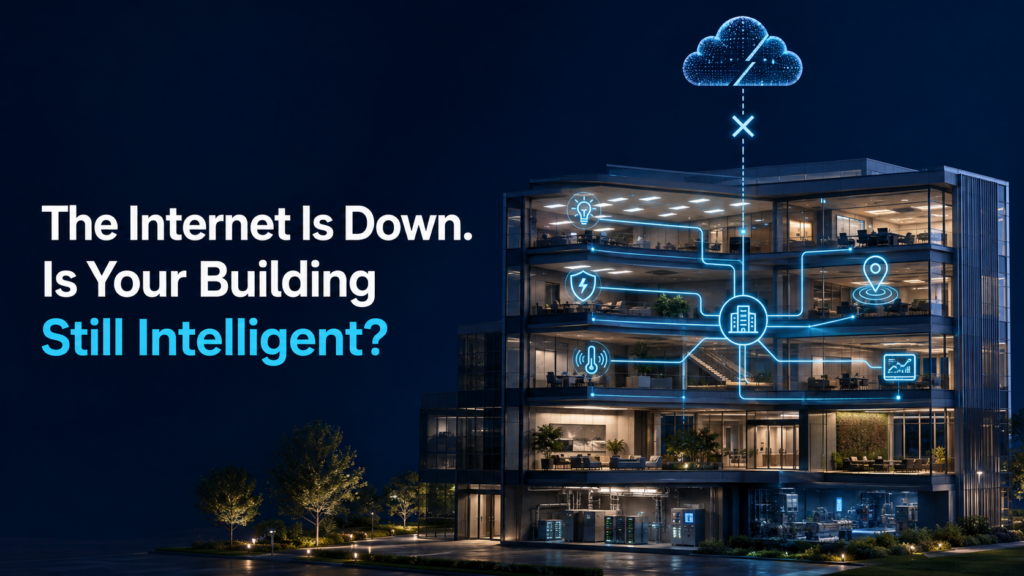
Picture this: it’s a busy Monday morning. Employees are arriving, meeting rooms are filling up and building systems are automatically responding to the start of the day.
Then, the internet goes down.
Emails stop syncing. Cloud applications freeze. Remote dashboards become unavailable.
That raises a bigger question:
“Does the building stop being intelligent when it loses its internet connection?”
It shouldn’t.
A truly intelligent building should continue performing essential local functions wherever possible. Cloud connectivity should add remote access, analytics and external communication, not become an unnecessary dependency for everyday building operation.
Internet Failure Is Not Building Failure
Here is the first distinction to understand:
👉 Internet failure is not the same as power failure.
If electrical power is available, local devices and building systems may still operate. What changes is their ability to communicate with cloud services and other systems outside the building.
The real question is not simply:
“Is the internet working?”
It is:
“Where does the building’s intelligence live—in its local systems, in the cloud or across both?”
A Simple Way to Think About It
Think of an intelligent building like a well-organized company:
- Local systems are the teams working inside the building
- The cloud is the central office connecting them to the outside world
If the central office becomes temporarily unreachable, the local teams should not forget how to do their jobs.
They may lose external communication and centralized visibility, but essential local operations can continue if the system is designed that way.
What Can Continue Locally?
Not every function behaves the same way during an internet outage. However, a well-designed intelligent-building system can keep many essential operations running locally.
💡 Intelligent Lighting
Lighting is one of the clearest examples.
Switches, sensors and controllers can communicate directly through a local Bluetooth Mesh network instead of sending every command to the cloud.
Depending on the system configuration, occupants may still be able to:
- Switch lights ON and OFF
- Raise or lower light levels
- Activate locally stored scenes
- Use occupancy-based lighting
- Use daylight-responsive control
- Maintain local device-to-device communication
The lights do not need to wait for a cloud command every time someone enters a room or presses a switch.
🚨 Emergency Lighting
Emergency lighting must continue performing its life-safety function regardless of internet availability.
During an internet outage, emergency luminaires and their essential safety operation should remain available according to the electrical and emergency-system design.
However, cloud-based features may be temporarily affected, including:
- Remote test monitoring
- Centralized emergency reports
- Cloud notifications
- Multi-site emergency-lighting visibility
Test results or device data may synchronize after connectivity returns, depending on the system architecture.
📍 Location Intelligence
Location intelligence can help facility teams understand the movement and location of people, assets and equipment across a building.
If detection and communication occur through the local network, devices may continue identifying or collecting location events during an internet interruption.
What may become unavailable is the remote side of the system:
- Live cloud dashboards
- Remote location visibility
- Multi-site tracking
- Cloud alerts
- Immediate synchronization of newly collected data
Whether information continues to be processed or stored locally depends on how the system has been deployed.
🌡️ Environmental and Occupancy Monitoring
Sensors may continue measuring conditions such as:
- Temperature
- Humidity
- CO₂
- Air quality
- Occupancy
- Space utilization
The sensors do not necessarily stop sensing because the internet is unavailable. However, cloud dashboards, remote notifications and centralized analytics may not display new information until communication is restored.
This is an important difference:
👉 Data collection may continue locally even when remote visibility is interrupted.
🏢 BMS Integration
Lighting, HVAC and other building systems are often connected through a Building Management System.
If the integration and control logic are hosted locally, essential communication between building systems may continue without an external internet connection. For example, local occupancy information may still be used to support lighting or HVAC control.
If an integration depends on a cloud-hosted service, that specific exchange may be temporarily unavailable.
This is why the project team should identify:
- Which integrations operate locally
- Which functions depend on a gateway
- Which services require the cloud
- What happens when any one of these connections is lost
⚡ OpenADR and Demand Response
OpenADR is different from local building automation because it connects the building to an external utility or demand-response provider.
If the internet connection is lost, the building may be unable to:
- Receive new demand-response events
- Send current status information
- Communicate with the external OpenADR service
- Respond to updated utility instructions
Previously configured local energy strategies may continue, depending on the system design. However, receiving new OpenADR events requires communication with the external service.
This distinction is important: local building intelligence and external grid communication are related, but they are not the same thing.
What May Be Temporarily Unavailable?
When internet access is interrupted, the building may continue functioning while some externally connected services become unavailable.
These may include:
- Remote access from outside the building
- Cloud dashboards
- Live cloud analytics
- Multi-building monitoring
- Remote configuration changes
- Cloud-generated reports
- Remote alerts and notifications
- Immediate data synchronization
- Externally hosted integrations
- Communication with OpenADR services
Think of it this way:
👉 The building can continue operating locally
👉 Remote visibility and external communication may temporarily go offline
A Real-Life Example
Imagine a school campus during an internet outage.
Inside the campus:
- Teachers can still operate classroom lights
- Occupancy sensors can continue responding in corridors
- Daylight control can continue adjusting lighting near windows
- Emergency luminaires remain available for their safety function
- Local building integrations may continue operating
- Environmental and occupancy sensors may continue collecting data
But the facility manager working from another location may temporarily lose access to:
- Cloud dashboards
- Multi-building reports
- Live remote alerts
- Location-intelligence updates
- Remote configuration
- New OpenADR events
The campus continues functioning. What it temporarily loses is its connection to external services and remote management.
What If the Gateway Fails Too?
An internet outage and a gateway failure are not necessarily the same.
A gateway commonly connects local devices to cloud applications, external integrations and remote-management tools.
If the internet is unavailable but the gateway remains operational, it may continue supporting certain local functions.
If the gateway itself fails, the effect depends on where the system’s intelligence is stored.
When switches, sensors and controllers communicate directly, essential local functions may continue. When a function depends entirely on the gateway, that function may be interrupted.
This leads to an important question:
“Does the building think locally—or does every decision have to pass through one central connection?”
Internet Failure, Gateway Failure and Power Failure
These three events should not be confused:
- Internet failure: Cloud services and external communication may become unavailable, while local systems can continue.
- Gateway failure: Functions routed through the gateway may be affected, although direct local communication may remain active.
- Power failure: Normal devices stop operating unless supported by emergency or backup power.
A resilient intelligent-building design should define how every major system responds to each condition.
Where Are Schedules and Automation Stored?
This is one of the most important questions to ask during system design.
Consider:
- Office lights switching OFF at 7 PM
- HVAC following occupancy-based settings
- Outdoor lights responding to an astronomical schedule
- Emergency tests running at planned intervals
- Building systems entering an after-hours mode
If the schedules and automation logic are stored locally, they may continue during an internet outage. If they depend on cloud-issued commands, some actions may be delayed.
Project teams should confirm:
- Where schedules are stored
- Which device maintains the system time
- Which rules run locally
- What happens when the gateway is unavailable
- Whether locally collected data is synchronized later
- How the system recovers when connectivity returns
When Does an On-Premise Solution Make Sense?
Some buildings require greater control over data, security and system availability.
An on-premise deployment can be valuable for:
- Data centers
- Healthcare facilities
- Government buildings
- Industrial sites
- High-security projects
- Facilities with strict data-sovereignty requirements
- Locations with unreliable internet connectivity
By hosting management services within the building, an on-premise solution can reduce dependence on external cloud infrastructure for centralized building operations.
It does not remove the need for good network design, backup power and proper commissioning. It simply gives organizations another way to balance connectivity, control and resilience.
Questions to Ask Before Choosing an Intelligent-Building System
Before selecting a solution, ask:
- Which functions continue without internet access?
- Which functions operate directly between local devices?
- What depends on the gateway?
- What depends on the cloud?
- Where are scenes, schedules and automation rules stored?
- Will data continue to be collected locally?
- What happens to BMS integrations?
- How are emergency functions separated from cloud services?
- What happens to OpenADR communication?
- Is an on-premise deployment available?
- How does the system recover when connectivity returns?
The answers reveal how resilient the system really is…
The Big Idea: Intelligent Shouldn’t Mean Fragile
Connected buildings gain enormous value from the cloud. Remote access, portfolio-wide visibility, energy reports, location intelligence, analytics and OpenADR communication all become easier.
But connectivity should expand what a building can do—not create unnecessary dependence for essential local operation.
Lumos Controls brings together intelligent lighting, emergency-lighting management, location intelligence, environmental sensing, BMS integration, OpenADR and building analytics within one connected ecosystem.
With the right architecture, essential building functions can remain responsive locally while cloud connectivity delivers wider visibility, intelligence and external coordination.
Final Thought
An intelligent building is not impressive simply because it connects to the cloud.
It is impressive when occupants barely notice that the cloud is gone.
Because the best building technology is the technology that quietly keeps working—while clearly understanding which functions are local, which are external and how the system should behave when connectivity is interrupted.
Conclusion
The true measure of an intelligent building is not only how connected it is—it is how reliably it continues to operate when that connection is interrupted.